for authors
archipelagos, a journal of digital practice, publishes scholarly articles, digital projects, and digital project reviews related to the Caribbean. We publish one issue per year and accept submissions on a rolling basis.
archipelagos accepts submissions in English, Spanish, and French. We will publish accepted essays in their original language with abstracts translated by our editorial staff. We also welcome contributors to solicit translation services for the full text of their contribution, which we will copyedit for inclusion in the journal.
All submissions should be conform with the Chicago Manual of Style.
Contact: archipelagosjournal@gmail.com
Table of Contents
Submission Guidelines for Articles or Reviews
archipelagos is founded on principles of minimal computing. We encourage our authors to help us avoid redundancy and costly workflows. We understand that unfamiliar environments and formats can be challenging to work with, and these guidelines are a work in progress as we strive for the right balance between our authors' needs and our mission. Your ideas are most welcome.
General Notes
We ask you to submit your abstracts and articles to archipelagosjournal@gmail.com. Most exchanges with authors will happen through email using this account.
-
Submissions of individual articles are accepted on a rolling basis. We also welcome proposals for themed sections.
-
Article submissions must include a bio (or bios for multi-author) and an abstract. Please place these at the bottom of your document. Images can be inserted directly in your document (see Images below) — you no longer need to send them separately. Video and sound should still be sent as links to a streaming service of your choice (see Video, Sound, and Interactive Media below).
-
We are an open access journal. If you are accepted for publication you will receive a copy of our Author Agreement (see the Author Agreement section below).
-
Articles are double-blind reviewed by our team of outside peer-reviewers. Digital project reviews are reviewed by the archipelagos Editorial Board. Contributors receive written notification from the editors (accepted, accepted with minor revisions, substantive revisions required or rejected) within two months of submission.
-
Copyediting begins upon successful completion of the peer-review process. Contributors can expect to receive an updated file with suggestions and queries from our Copy Editor. The revised file must be returned within two weeks of receipt. This will be the final opportunity to make substantive changes to the file. Contributors will receive a final PDF and link to the site close to launch for minor edits.
-
Throughout the editing and production process, contributors are expected to watch e-mail for any last-minute queries from archipelagos editors. Prompt responses will help to maintain schedules.
File types
Documents
Office formats (.odt, .doc, .docx): Most of the cleanup we do by hand comes down to a handful of formatting habits. If you can follow the points below, your file will convert to our publishing format almost automatically — please read them closely.
-
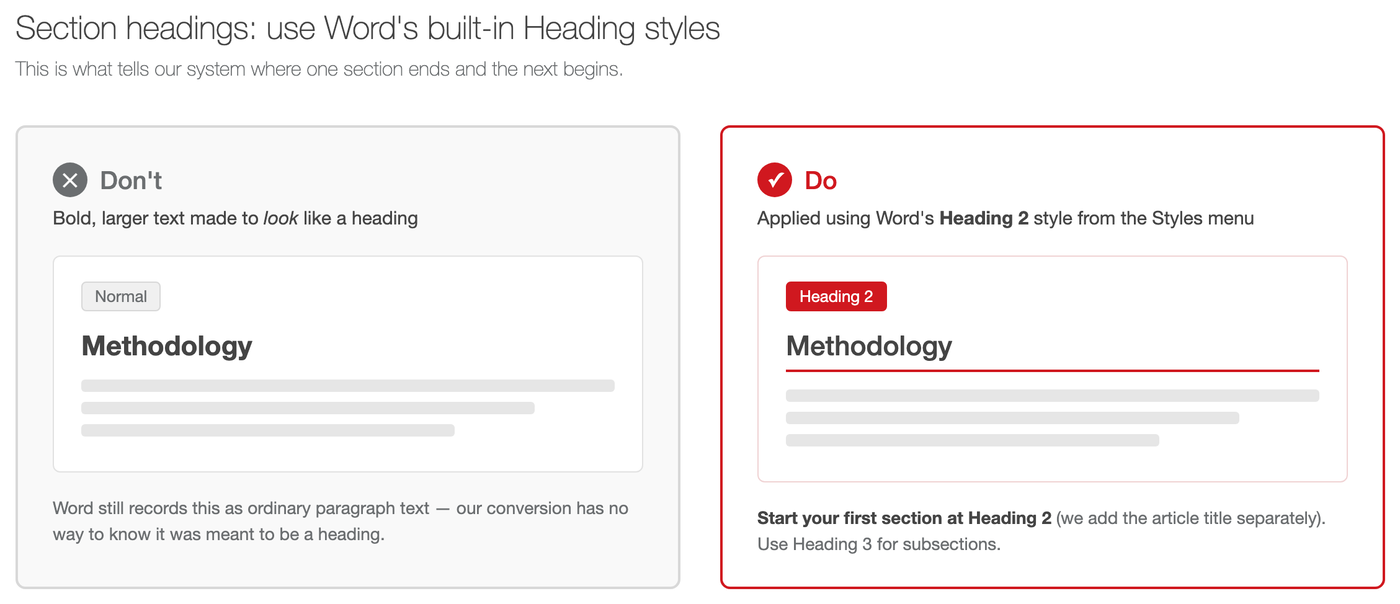
Use Word’s built-in Heading styles for your section titles — never bold text. Apply “Heading 2” (from the Styles menu) to your first section, and “Heading 3” for any subsection within it. Bold, underlined, or larger text that’s only made to look like a heading is invisible to our conversion tool — it has no way to tell it apart from a bolded word in the middle of a sentence, and your section breaks will be lost.
-
Hyperlink your link text directly, rather than spelling out the URL in the sentence. In footnotes, do both — spell out the link and hyperlink it, e.g. http://example.com.
-
Always include
http://orhttps://at the start of a link, or it won’t work once converted. -
Turn off “smart quotes.” Please use straight quotation marks (
"and'), not the curly ones Word inserts by default. -
Use plain hyphens and dashes: a hyphen (
-) for compound words, an en-dash (--) for ranges, an em-dash (---) for a break in a sentence. -
Don’t lay out the document yourself. Columns, text boxes, and manually placed spacing will not survive conversion. If you need something laid out a particular way, describe it in plain prose, in [square brackets], and we’ll take it from there.
-
Don’t use Word’s table tool or data fields. See Tables below for the formats we do accept.
-
Insert images directly where they belong, then caption them with a short rubric. See Images below.
Markdown (.md): Publishing is in many ways a game of file conversions. Both our website and PDFs are built from the same Markdown files. We accept plain text files (UTF-8 encoding), written using Kramdown syntax, a version of Markdown, and saved with the .md extension. This helps us keep our workflow light and our file types closer to the production line, contributing in turn to our continued ownership of all aspects of journal production. For some background on our infrastructural choices, and to get started with Markdown, please take some time to read “Sustainable Authorship in Plain Text using Pandoc and Markdown,” by Dennis Tenen and Grant Whytoff. We sincerely appreciate those who submitt well formatted Markdown to us directly.
Images
At archipelagos we value the richness of our visual culture. If you are submitting your own photography, be mindful of frame, color harmonies, and other design elements. Remember also that image files can contain embedded metadata you might not want to publish. Images are open to the review process just like your text.
Please provide crisp images: a minimum of 144ppi resolution and at least 800 pixels wide. JPG is our preferred format; PNG is fine for images with transparency or simple flat colors (e.g. a logo).
Insert each image directly in your document, at the point where it belongs — the same way you would normally add a picture in Word (Insert > Pictures). You no longer need to send us images separately in a zip file; our conversion tool extracts them from your document automatically.
Immediately below each image, type three short lines of plain text with the additional information for the image — a blank line (Enter) between each one, no bullets, and no manual line break in the middle of a line:
caption="insert caption here"
alt="insert alt text here."
url="http://example.com" (optional)
caption is shown to every reader, printed beneath the image on the site and in the PDF.
alt is read aloud by screen readers. Describe what’s in the image — don’t just repeat the caption.
url is optional. Only include it if the image itself should link somewhere, such as its original source.
Example:
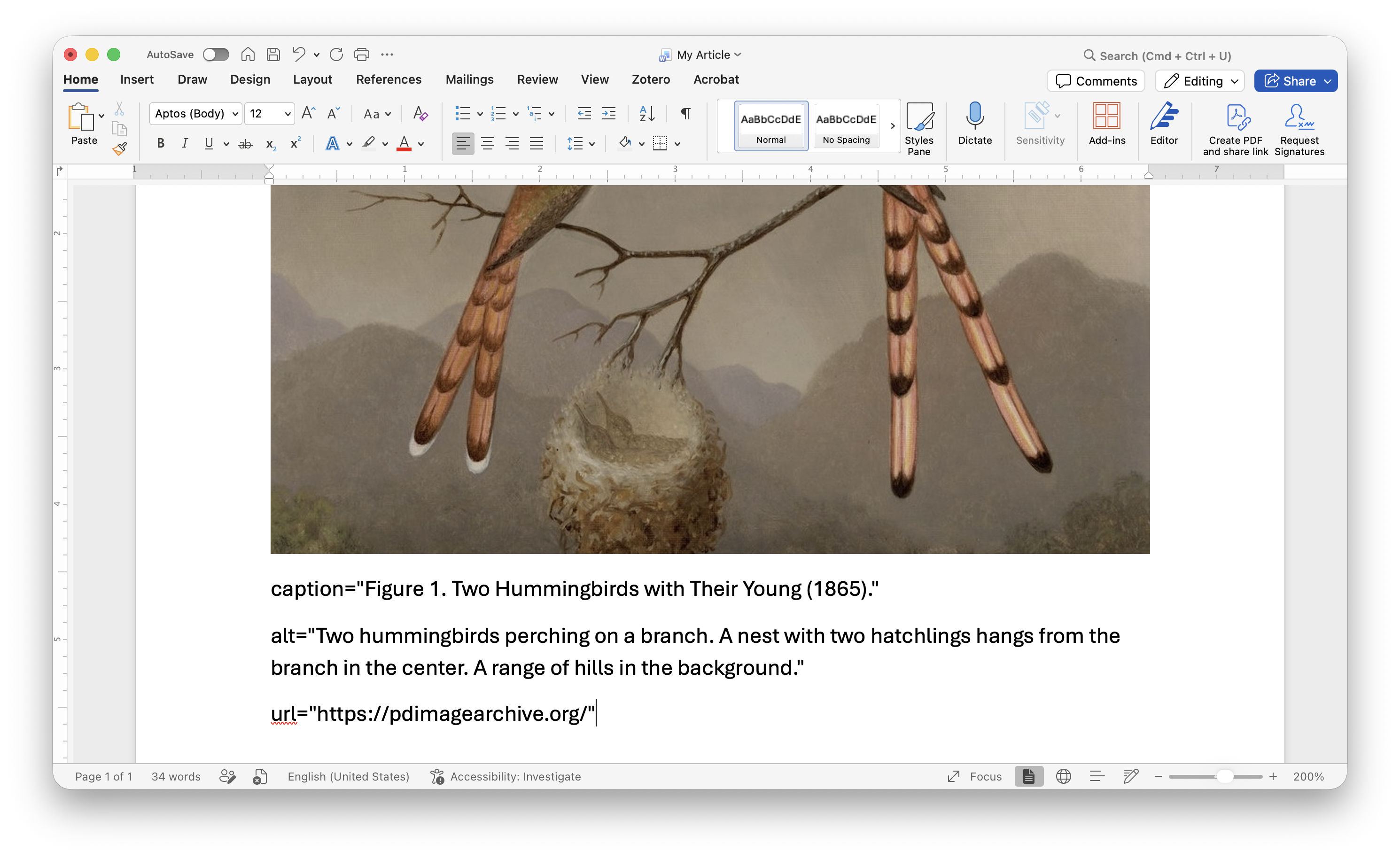
caption and alt are required; url is optional. If either needs to include quotation marks, escape them with a backslash, e.g. caption="She said \"hello\" to the camera".
Haven’t inserted your image yet? Submitting in Markdown? If you’re working in Word and haven’t added the photo yet, or you’re submitting directly in Markdown (where there’s no “insert picture” step), use a placeholder instead: type the same rubric as above, but add one more line above the others with the image’s filename, and send us that file separately alongside your document:
img="my-image.jpg"
caption="insert caption here"
alt="insert alt text here."
url="http://optional-url.com"
If you use a placeholder, please name the file using one or two keywords separated by a hyphen, with no spaces or capital letters (e.g. harbor-sunset.jpg) — this becomes part of the file’s permanent address on our site.
Video, Sound, and Interactive Media
In order to make our articles and reviews available in PDF, and in order to increase the longevity of the Web files, we separate interactive media from static text and images. For video and sound, we encourage our authors to use a streaming service of their choice. Be mindful of privacy, stability, and copyright concerns when choosing streaming video. When required, we can provide you with a Digital Publication Agreement Form to use with rights holders.
Since archipelagos was born of the need to support emergent forms of digital scholarship, we are also open to including interactive media (e.g., maps, visualizations) in our articles. We ask that you provide us, whenever possible, a full-screen version of your interactive media hosted elsewhere.
To include any of these media types, take a screenshot and insert it directly in your document like any other image (see Images above), then use the same caption/alt/url rubric — with the url pointing to the full-screen version (whenever possible) of your interactive media, sound file, or video. Whenever appropriate, use a screenshot with the play button visible. For example, if it’s a YouTube video, take a screenshot of the full-screen version with the red and white play button in the center.
Hyperlinks
All referenced pages (whenever possible and allowed by the site’s robot.txt file) should point to a specific archived copy at the Internet Archive whenever possible. If a copy does not yet exist, please create one using their “Save Page Now” feature. Let us know if you need help with this process.
Please ensure that all external and internal links in your document are working before submission. Many websites and Web pages disappear or become displaced over time. In order to avoid link rot, we run periodic build tests to ensure the viability of our internal and external links. Despite these measures, some links will be lost in the years to come. In order to minimize the impact on your article, please provide appropriate citations when the links are fundamental to the argument and you cannot provide an archived copy at the Internet Archive.
External Documents
When sharing external documents, do not link to cloud storage services (e.g., Dropbox, Google Docs) or closed-access sources. In these cases, simply cite the documents. If you have permission to use them, you may be able to submit them with your files. We do welcome and encourage links to open institutional repositories.
Tables
If you would like a table to display as you read your text you can submit it either as a .csv (Comma Separated Values) file or written directly in kramdown/markdown, its final format. In general, we prefer the simpler table formats. Please avoid rowspans, for example. If you feel you need a complex visualization, consider submitting an image or hosting the visualization elsewhere and linking to it from a screenshot.
If you would like to submit a more complex table you can do so as a separate PDF. We would then link to the table from within the text.
We do not accept tables in Office format.
Submission Guidelines for Digital Projects
archipelagos accepts mid-stage digital scholarship projects beyond the article or monograph format for single-blind review after our editorial team has had a first round of vetting. A polished version of the review will be offered to the project team or lead as coming from archipelagos and written in the royal “we.” We expect the team to take the review seriously, and make appropriate and feasible changes to the project accordingly.
Interactive and multimedia submissions. A piece that renders its content with JavaScript must be accompanied by a linear text version of the same material, supplied as a separate document. The interactive remains the authored work; the text version is what makes it citable, searchable, and reachable by a screen reader. Without one, a JavaScript-rendered piece exposes almost no text to a reader using assistive technology, or to anyone trying to find it.
Throughout the review and publication process, our editorial team will work with you to provide constructive feedback on your project. You remain, of course, responsible for the development and upkeep of your project before and after we showcase it on our platform. If your project is accepted in our digital projects featured section, we will also publish the review exchange between our reviewers and your team. If the review process works for all parties, we offer the opportunity to launch or highlight your project upon publication of the relevant archipelagos issue.
In addition to reviewing projects directly, we support essay-length “project narratives” that describe the process, infrastructure, or new major feature of a digital project. These essays go through the same single-blind method as projects, and will be published alongside featured projects. If you have any questions about which is the right fit for you, feel free to contact us.
We are particularly keen to support projects that make an important scholarly contribution to the study of the Caribbean; that are conscious of the design process and underlying infrastructures of digital technology; that acknowledge the contribution of all members of the team appropriately; and that have taken into account matters of longevity and ephemerality. For a more detailed sense of our criteria and process, please consult the guidelines we have prepared for our reviewers.
Direct Project review occurs in two phases:
-
Authors submit a Project Statement consisting of a 500-to-700 word description of the project. Reviewers will offer initial feedback within four to six weeks based on the description and an exploration of the project. If the project is still in beta and not available publicly, you must share a link to the development site. We will ensure that the link does not leave our editorial circles.
-
Authors respond to reviewer feedback in a 1000-to-1200-word narrative and provide a link to a navigable beta site for final review.
-
The editors will write an introduction to the project and compile the project’s own introduction written exclusively for us, the reviewer comments and the response from the project team or lead for final publication on a dedicated project page.
Project description essays will follow the same process as an article review.
Author Agreement
Read the Author Agreement. This Agreement reflects the position that the Author(s) should retain the copyright to the Article and should have explicit rights to use the Article in future research, teaching, and other projects. Author and journal rights can be summarized as follows:
- Authors maintain copyright without restriction;
- authors grant archipelagos the authority to publish their work in the journal with a Creative Commons Attribution 4.0 International License;
- authors maintain publication rights without restrictions;
- authors grant archipelagos the right to archive a copy of articles, when applicable, on a University repository or other open access repository;